Friday, August 29, 2008

SHOULD I USE COMPRESSORS, LIMITERS AND EQ'S?

Compressors, limiters and eq's are some of the most important tools in a studio's rack. Judicious use of these processors can make the difference between a mediocre mix and great one. However they are probably the most abused and overused processors, and compressors and limiters are probably the least understood of all gear.

Compressing, limiting and eq'ing the entire mix is best left for the mastering process. A properly equipped mastering suite will have the finest quality processors available, and will usually have a variety to choose from both analog and digital.

Caveat: some music, such as heavy metal, is dependent on the whole mix being highly compressed to the point that the compression is as much an effect as it is a level control. In cases such as this it is often necessary for the engineer to mix with compression patched to the overall stereo output because extreme compression will actually change the mix.

The most critical use of these processors in the studio is to patch them to individual tracks that require them as opposed to the overall stereo mix. If the bass guitar, vocal, or whatever element of the mix won't sit in the mix properly - it wanders from too loud to too soft - then a compressor patched to that instrument or vocal will restrict it's dynamic range so it stays put.

If the engineer knows his gear, he will be able to compress signals that are too wide dynamically while they are being tracked. If you are recording to analog tape this will make a difference in the noise floor of those tracks, and it can also improve resolution in a digital track by keeping the average level of the signal higher on the recording scale.

Tip: If you are trying to record a signal that is more extreme in dynamic range than usual, it is often best to apply some compression while cutting the track - say 2 to 4dB of gain change - and then compress it more as required during mixdown as opposed to trying to compress a lot during one stage or the other. This will also allow you to experiment with different ratios and attack/release times during the two steps.

If you have your own recording set up and you already have a really good mic or two, one of the best investments you can make is in a high quality mic preamp and processing setup. This has been a secret weapon of professional musicians since the 1960's - if you only record with one or two mics at a time, you don't need an expensive 40 input console to make professional quality recordings, you just need a couple of really good mic pre's, eq's and compressors. For a small investment you can have a couple of recording channels that are equal to the best recording consoles made, and if you choose correctly they will beat the sound of mic pre's and eq's in consoles up to the $50,000.00 range and beyond.

IF WORKING WITH HIGH RESOLUTION DIGITAL AUDIO:

If you are working with a high density system, you can track and mix at a sampling rate of 88.2kHz or 96kHz, with a resolution of 24 bit or greater. This would necessitate delivering your product for mastering on Data CD-R, DVD-R or a Macintosh-formatted hard drive as described in 24-bit & beyond., Or mix to one of several high density digital recorders available on the market, which might necessitate you providing your own machine for the mastering session.

Even though the sample rate will have to be converted to 44.1k for the CD master, this gives you the option of archiving your mastered material at 88.2 or 96k, 24 bit for future release on high-resolution formats such are DVD-Audio and Super Audio CD (SACD).

DIGITAL vs. ANALOG AS ORIGINAL MASTERS

f your budget allows, 1/2" analog 2-track running at 30 i.p.s. with no noise reduction is the preferred mixdown format of probably 90% of the industry's top 40 producers. And increasingly since 1999 most major label albums and singles are also tracked on analog multitrack. This is true of all genres of music with the exception of classical, which is almost all digital, and most top jazz and electronic music producers prefer digital as well.

And that pretty much tells the story; all classical and many jazz recordings need to be very accurate, honest reproductions of acoustic instruments. We know what a violin, cello, grand piano, flute, trumpet, upright bass etc. is supposed to sound like because we have a real-world reference for those acoustic instruments. Digital can yield a much more accurate recording, and if top quality A-to-D converters are used to make a 24 bit recording at 88.2k or 96kHz sampling rate, then the sound quality is arguably as good or better than analog. Classical and jazz purists also demand a wide dynamic range - the difference between loud and soft - in the reproduction of the music. The difference in volume between a single triangle being lightly struck and the complete orchestra with percussion hitting a mezzo forte is staggering, and this requires your recording medium to have a very wide signal-to-noise ratio. Digital, especially 24 bit digital, is the hands down winner over analog in this respect. It is practically impossible to faithfully reproduce the dynamics of classical or small-group jazz via analog without having to resort to noise reduction, which presents its own set of problems.

Another advantage that digital has in the recording of acoustic instruments is its absolute speed accuracy. The slight, rapid speed variations in even the best analog recorders - called 'wow & flutter' - can severely alter the very high harmonics in the sound of an acoustic instrument, and this can ruin the naturalness, and therefore the believability if you will, of the reproduction.

The other end of the musical spectrum - electronic music - also most often prefers digital. Music that is based on electronic or sampled sounds with very sharp, fast attacks is sometimes softened up too much by analog tape, especially if recorded at too hot of a level. Producers of this music genre will most often prefer to cut on 24 bit digital, mix to 24 bit digital, and then have the option of laying-back to analog 2-track or using analog processing during mastering, or staying digital all the way.

Conversely, rock, pop, rap, r&b & country are the genres that are gravitating to analog. These musical styles are based on electric instruments often with effects and distortion that have no real-world acoustic reference for their sound. The idea in production is to make the music sound larger than life, and to somewhat (or completely) restrict the dynamic range of the music. The coloration that analog tape adds helps greatly in this regard, plus it alters the signal in a way that is very familiar to our ears since all music up to the late seventies/early eighties was recorded, mixed and reproduced via analog media, and even throughout the age of the Compact Disc many producers have stayed with analog multitracking and mixing as they have realized all along that it is the superior sound. And as previously stated, not only is the pop music industry going back to analog in droves, they are going all the way back, with tube preamps, mics, compressors, eq's and now complete tube consoles being all the rage.

You might be surprised how affordable it is to rent an analog 2-track machine for mixdown. The machine preferred by most producers is the Ampex ATR-102 1/2", as featured at Digital Editing Services, and these machines normally rent for around $150.00 per day, with most rental places offering 7 days for 4, which means it's around $600.00 for a week. Not bad for the sonic difference that mixing to and mastering from analog can make.

But all is not lost if you track and mix in the digital domain. "Layback" mastering has been a preferred mastering technique of the industry's top mastering engineers and producers for several years, and Digital Editing Services now has this capability.

Four types of pro setups

There are 4 distinct ways about setting up a high end DAW with an audio card. Knowing where you want to go is very important before even looking at audiocard's
  1. Mixing with a real analog desk. None or very little processing is done in the computer as all outboard gear like EQ's, reverb compressors ect. are used.
  2. Mixing down in software. An audiocard with built in or externally added on preamps with very little extra outboard gear. Everything is done in software including the mix down. A control surface for your software can be added on to give more hands on control.
  3. A motorized digital mixer like a yamaha o3d,o1v ect with an adat IO board in the mixer and adat card installed in the computer.
  4. Laptop setup or other stand alone recorder like a Roland VS series.

Professional Audio Cards

Before comparing different features and types of professional cards I want to encourage people to look at what they hope to achieve now and in the future even if its 5 years or more away from their current purchase. A professional card does not get outdated very quickly like soundcard's and choosing the right one depends on what sort of setup you want to end up with. On average a pro audiocard will last around 6 years before being superceded and a new model is released.

The gear you'll need for pro recordings...

  • Mic's
  • Preamps to raise any mic's to line level. Some audiocard's have preamps built in or this could be a mixer
  • Audiocard + Computer
  • Software
  • Dynamic processing which includes compressors, gates and limiters ect.
  • Reverb and other special effects
  • Control surface if you don't have a mixer. Although not necessary www.evolution.co.uk have affordable ones so they are no longer a luxury piece of gear and make the whole recording process more enjoyable and faster.
  • Amp and speakers (audio monitors)


People quite often overlook (or don't know) the fact that they will need a mic preamp in order to use microphones. Microphones opperate at very small voltage levels and if your not using a mic preamp the mic's signal will most likely record into the computer at around -60 - 70 dB which is very close to the noise level of most audiocard's You cant normalize the audio up after its recorded as you'll also raise the noise floor and its very hard to record without monitoring your playing/singing. For this reason a mixer, stand alone mic preamp or an audiocard with built in mic preamps is what you'll need if your wanting to record microphones. This brings us to the next thing you need to consider to plan your system..

Tips: Condenser Recording Mics

The two types of condenser microphones

This article mainly concentrates on condenser mics for recording as dynamic mics are no where near as versatile as a budget condenser mic. I wont cover the types of mics and how they work as that has already been covered in this article. Almost the only dynamic mics used in recordings, are mics that need to handle loud signals like a kick drum mic for example, or in situations where the recording is of a live performance on stage and background noise and feedback are considerations.

Generally speaking almost any carefully chosen budget condenser mics will sound better for recording then a dynamic mic. There are good reasons why this is the case as the diaphragm which captures the sound waves do not have a heavy magnet attached impeding the movement of the diaphragm This allows a condenser to react to smaller sound waves and capture more detail and truer to the original sound your trying to record. More on the types of microphones and how they work HERE.

There are two types of condenser mics, the electret and gold diaphragm types. The manual or spec sheet that the mic comes with will indicate what type of capsule that the microphone uses. Below the two types are discussed.

Electret condensers

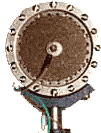
The lowest end condenser microphones will be using an electret capsule like the one in the picture to the right. These capsules are normally used in lapel, headset and reference testing mics where a small head is required. They are also very efficient and run on low voltages hence why they are commonly found in computer mics and older hearing aids. Some, but not all pencil (small diaphragm) condensers use these capsules as they are cheap and have a good flat frequency response. If your looking for a good sounding pencil condenser then try to find a suiatable mic with a gold diaphragm. In electret condensers the diaphragm is enclosed in metal and generally speaking these mics don't sound as good as a mic with a gold diaphragm which I'll discuss in the next section. This does not mean that all electret and microphones that take a single AA battery sound bad, this could not be further from the truth. However gold diaphragm mics will nearly always sound better especially when looking at budget mics in the sub US$500 range.

Picture: Electret Recording Condenser Mics

Gold diaphragm condensers

Picture of Gold Diaphragm Recording Mics

The gold Diaphragms are pictured to the left and are found in all high end professional recording mics. The diaphragm is normally open (behind a mesh grill) and not enclosed in metal like the electret which gives a much better open and clearer sound. Some of these mics can be powered on batteries, however they normally require a 9 volt battery to run or the full 48 volt phantom power.

The diaphragm in all higher end mics use a mylar material with a gold vapour coating. Gold is used for one major reason. It does not rust and the resistance of gold is fairly constant, unlike copper and silver which whilst they are better conductors, they rust and corrode which causes the performance to drop. The cheaper mics under US$600 will normally have a cheaper plastic diaphragm with the gold splattered coating, which does not perform as good as mylar which is used in the famous M7 capsule. Only the very high end mics use mylar and many chinese mics claim to have mylar when in fact they are only plastic. There are very subtle differences between the plastic and mylar materials which depending on your budget you may not condsider worth the jump in price. There are only a few factories world wide that can produce a gold diaphragm so you quite often find that lots of mics share the same parts and sound and look very similar. Quite often the same factory produces both brands which is the case with most chinese made mics in the market.

by:http://www.pcmus.com/Condenser-Recording-Mics.htm

Thursday, August 28, 2008

Audio mastering

Mastering, a form of audio post-production, is the process of preparing and transferring recorded audio from a source containing the final mix to a data storage device (the master); the source from which all copies will be produced (via methods such as pressing, duplication or replication). The format of choice these days is digital masters, although analog masters, such as audio tapes, are still being used by the manufacturing industry and a few engineers who specialize in analog mastering.

Bob Katz, a published author and mastering engineer, has said that mastering is an art form and it should be relegated to a mastering engineer. This task should not be executed even by the best and most experienced multi-track audio and live music engineers.[1]